EFGW Gateway
EFGW is the new EUROfusion Gateway system hosted by CINECA in the headquarter Casalecchio di Reno, Bologna, Italy. The cluster is supplied by Lenovo Corp. and is equipped with 15 AMD nodes, including 4 nodes with fat memory (1.5 TB), and 1 node with 4 H100 GPUs and local SSD storage.
How to get a User Account
Users of the old EUROfusion Gateway were migrated on the new system with the same username.
For new users: to get access to EFGW the following steps are required:
Register on UserDB portal
complete the registration filling your affiliation in the Institution page and uploading a valid Identity Document in Documents for HPC page.
Download the
Gateway User Agreement(GUA)Fill and sign the GUA, send it via email to EUROfusion Coordination Officer Denis Kalupin (Denis.Kalupin-at-euro-fusion.org)
After the GUA is signed by the EUROfusion Coordination Officer, the user will receive an email that has been associated to a project
The user needs then to go on UserDB portal, click on HPC Access page and then on Submit button to formally request to be granted access to the Gateway
We proceed to verify the data on the UserDB and grant the user access
The user receives two email with username and the link to configure the access via 2FA (see following Sections).
Warning
If the Submit button does not appear, it means that one of the above steps have not been properly completed. The page shows what is missing signed as not OK.
Access to the System
The machine is reachable via ssh (secure Shell) protocol at hostname point: login.eufus.eu.
The connection is established, automatically, to one of the available login nodes. It is also possible to connect to EFGW using one the specific login hostname points:
viz05-ext.efgw.cineca.it
viz06-ext.efgw.cineca.it
viz07-ext.efgw.cineca.it
viz08-ext.efgw.cineca.it
Each login node is equipped with two AMD EPIC 9254 24-Core Processors. An alias hostname pointing to all the login nodes in a round-robin fashion, will be set-up in the next weeks.
Warning
The mandatory access to EFGW is the two-factor authentication (2FA) via the dedicated provisioner efgw. Get more information at section Access to the Systems.
- Please note: EFGW users have to obtain the ssh certificate from the efgw provisioner.
In the section How to activate the 2FA and the OTP generator use the step-CA EFGW client in the place of the step-CA CINECA-HPC client
In the section How to configure smallstep client Step 3, obtain the ssh certificate from the efgw provisioner
step ssh login 'username' --provisioner efgw
In the section How to manage authentication certificates, use the efgw provisioner in all the key step commands (certificate re-generation, certificate creation in file format)
How to access EFGW with NX
Get a ssh key with step and put it in your $HOME/.ssh folder
step ssh certificate 'username' --provisioner efgw ~/.ssh/gw_key
Configure a NX session as follows:
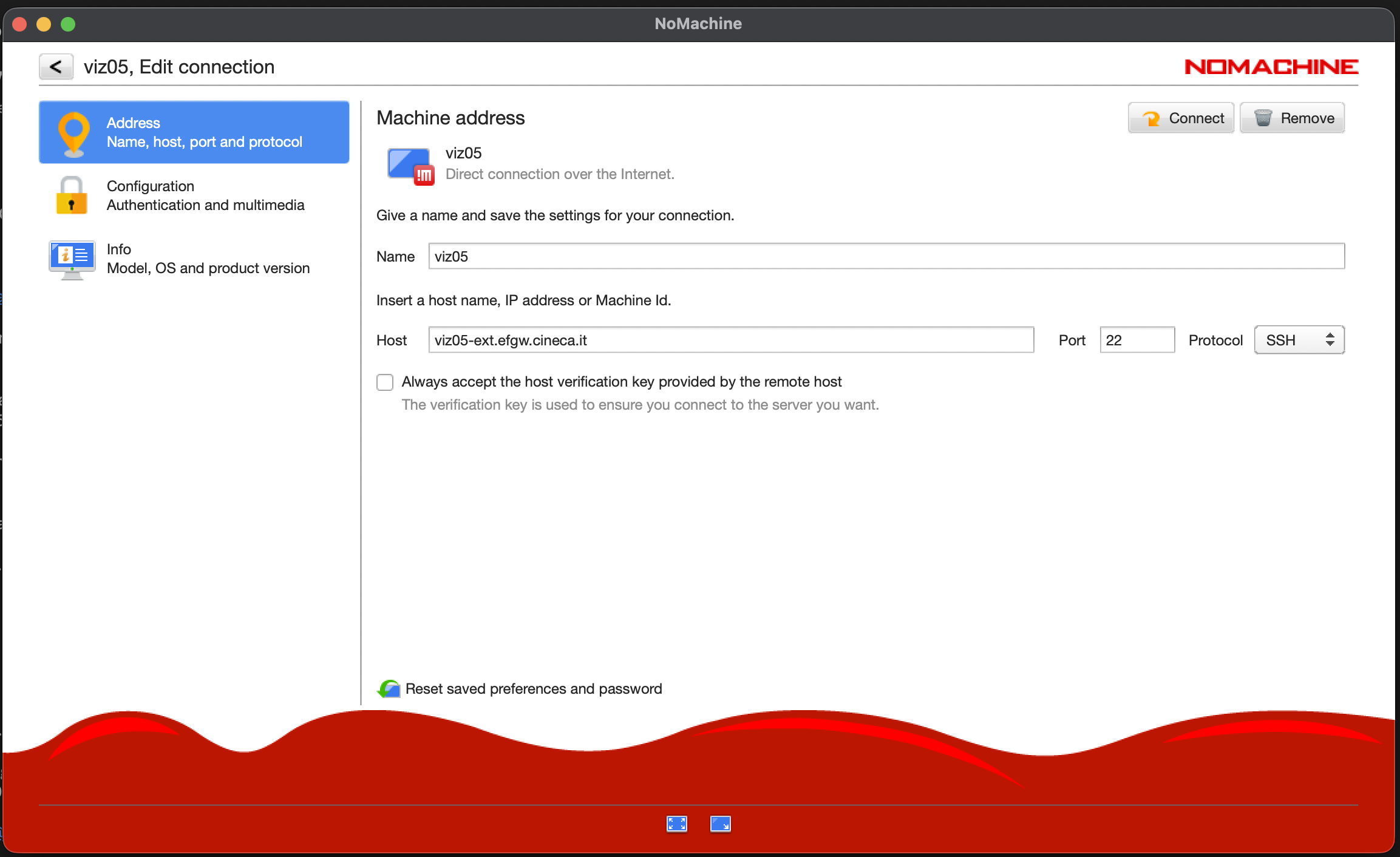
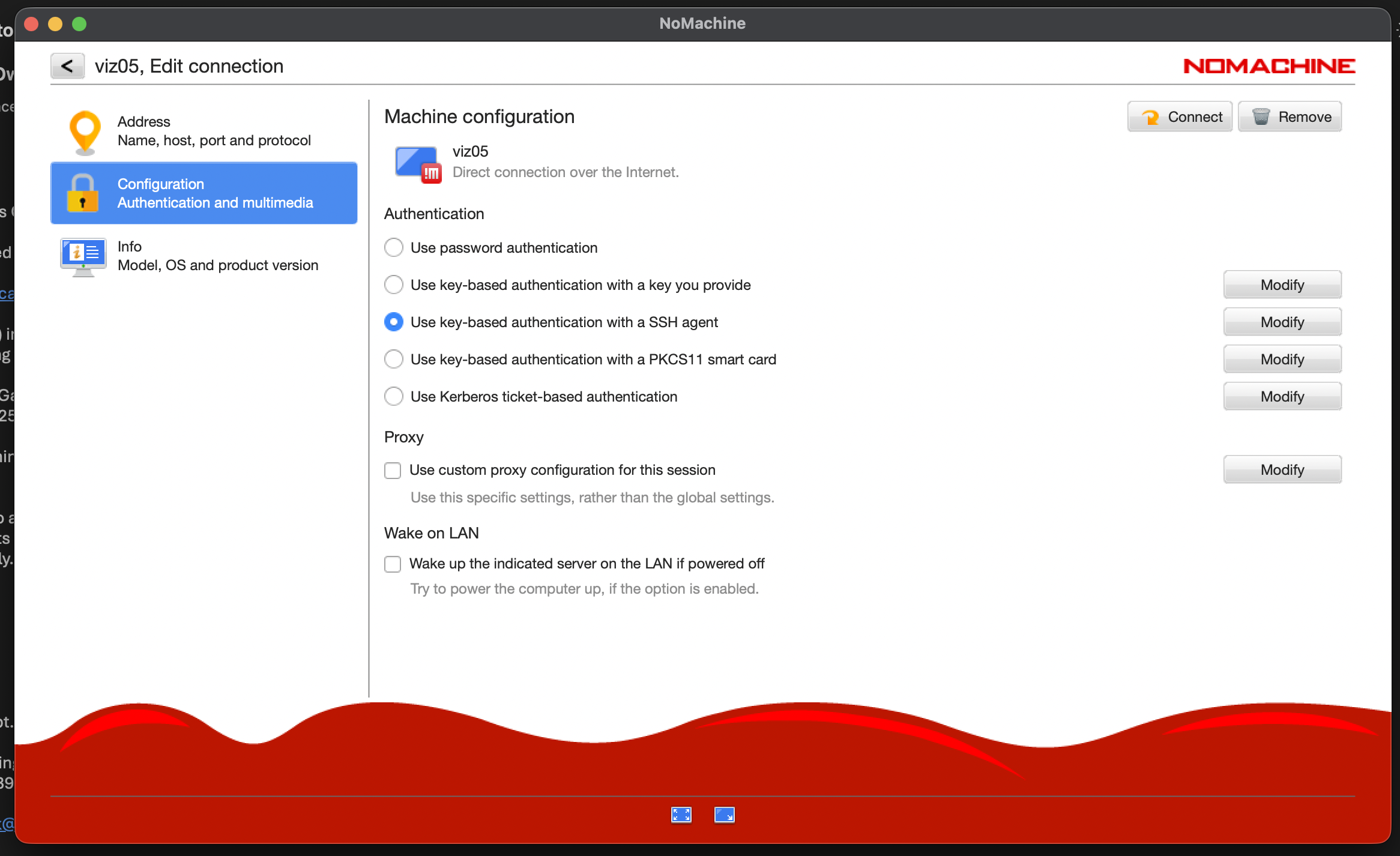
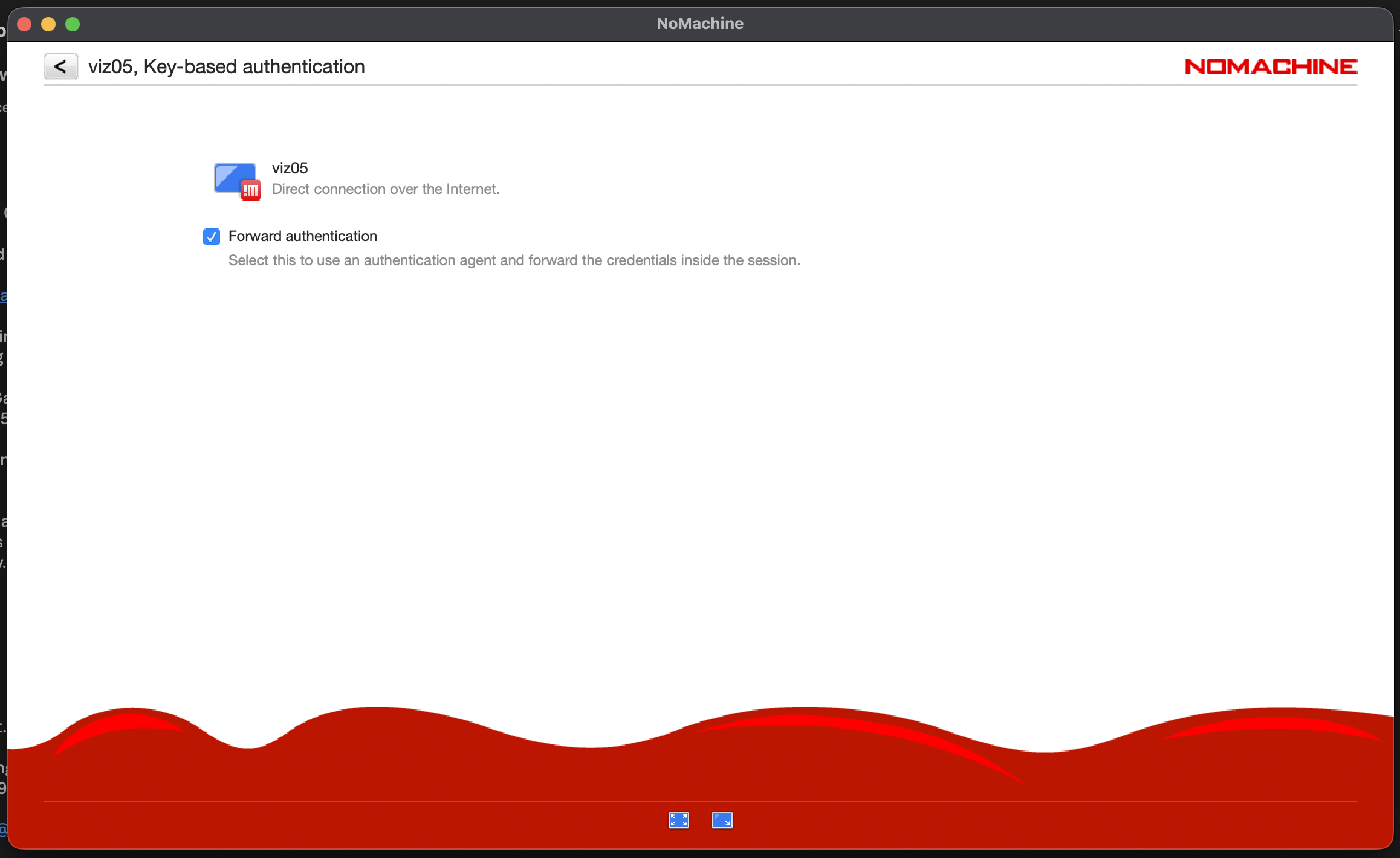
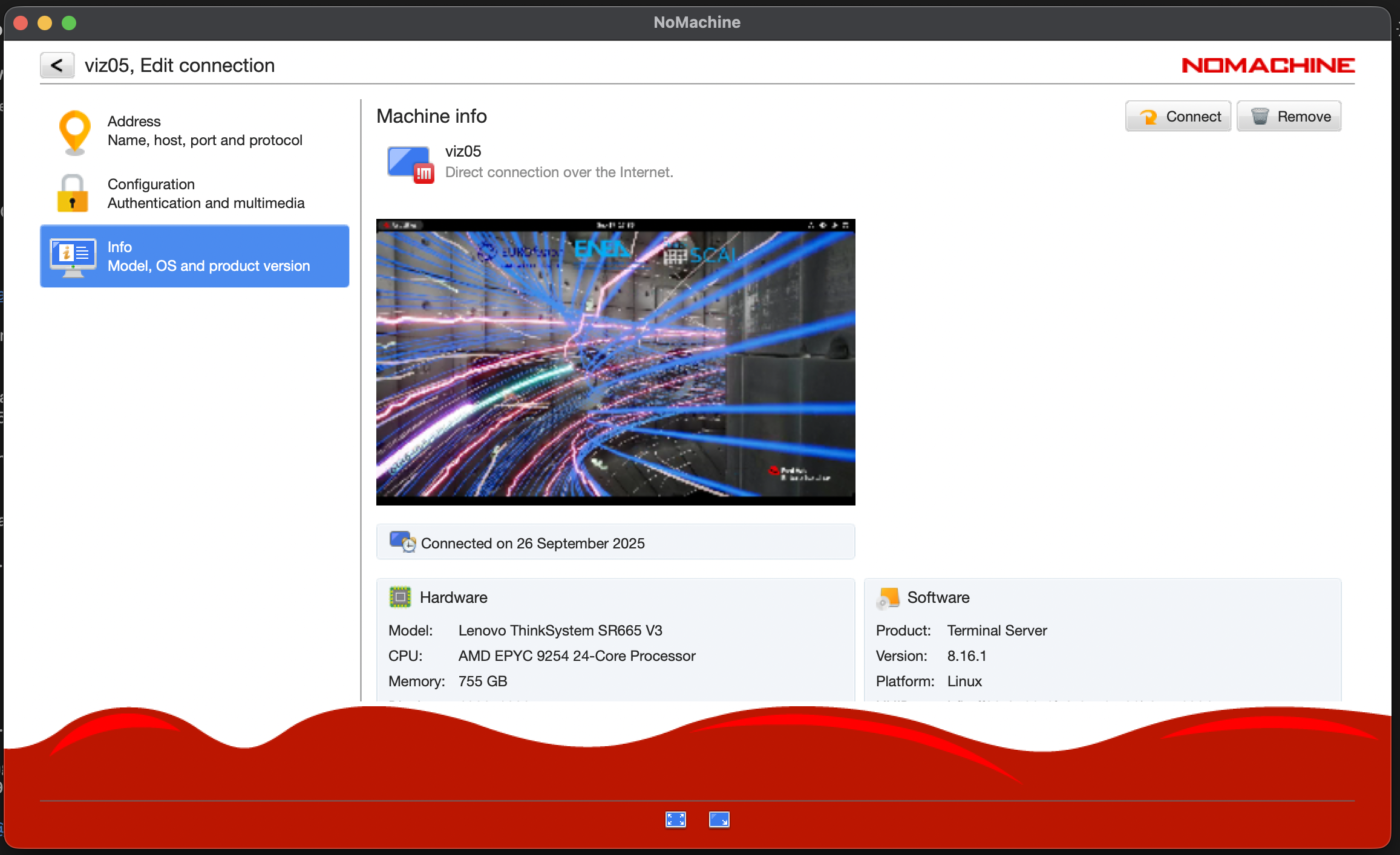
You can freely install software on your NX desktop using the “flatpak” package. Please refer to the official documentation for instructions on how to use it.
Please keep in mind that you need to use it with the –user flag.
System Architecture
The cluster, supplied by Lenovo, is based on AMD processors:
10 nodes with two AMD EPYC 9745 128-Core Processors and 738 GB DDR5 RAM per node
4 nodes with two AMD EPYC 9745 128-Core Processors and 1511 GB DDR5 RAM per node
1 node with two AMD EPIC 9354 32-Core Processors, 4 H100 GPUs, and 738 GB DDR5 RAM per node
File Systems and Data Management
The storage organization conforms to CINECA infrastructure. General information are reported in File Systems and Data Management section. In the following, only differences with respect to general behavior are listed and explained.
The storage is organized as a replica of the previous Gateway cluster with the data of /afs and /pfs areas copied on the new lustre storage system (no afs available, only the data were copied). Please notice that the path /gss_efgw_work, linked to the /pfs areas on the old Gateway, does not exist on the new Gateway.
Warning
The backup service on the $HOME area is currently not active, due to the ongoing installation of our new automatic backup system, which will be completed in the forthcoming weeks.
The $TMPDIR is defined:
on the local SSD disks on login nodes (2.5 TB of capacity), mounted as
/scratch_local(TMPDIR=/scratch_local). This is a shared area with no quota, remove all the files once they are not requested anymore. A cleaning procedure will be enforced in case of improper use of the area.on the local SSD disk on the GPU node (850 GB of capacity, default size 10 GB )
on RAM on all the 14 cpu-only, diskless compute nodes (with a fixed size of 10 GB)
On the GPU node, a larger local TMPDIR area can be requested, if needed, with the Slurm directive:
$ SBATCH --gres=tmpfs:XXG
up to a maximum of 212.5 GB.
Environment and Customization
The main tools and compilers are available through the module command when logging into the cluster:
$ module av
To have all the modules of aocc, gcc, and oneapi stacks installed from CINECA staff, you need to load the “cineca-modules” module and execute “module av” command:
$ module load cineca-modules
$ module av
For getting information about “module” usage, compilers, and mpi libraries you can consult the The module command and Compilers
You can install any additional software you may need with flatpack or SPACK .
How to make your $HOME/public open to all users
In order to configure on the new EFGW your $HOME/public as it was on the old EFGW afs filesystem, please add the proper ACL to your $HOME directory as follows:
$ setfacl -m g:g2:x $HOME
Job Managing and Slurm Partitions
In the following table you can find informations about the Slurm partitions on the EFGW cluster.
Partition |
QOS |
#Cores per job |
Walltime |
Max jobs/res. per user |
Max memory per node |
Priority |
Notes |
|---|---|---|---|---|---|---|---|
gw |
noQOS |
max=768 cores |
48:00:00 |
2000 submitted jobs |
735 GB / 1511 GB |
40 |
Four fat memory nodes |
qos_dbg |
max=128 cores |
00:30:00 |
Max 128 cores |
735 GB / 1511 GB |
80 |
Can run on max 128 cores |
|
qos_gwlong |
max=256 cores |
144:00:00 |
Max 128 cores, 2 running jobs |
735 GB / 1511 GB |
40 |
Four fat memory nodes |
|
gwgpu |
noQOS |
max=16 cores/1 gpu / 188250 MB |
08:00:00 |
1 running job |
735 GB |
40 |
Note
In the new Gateway the debug partition has been replaces by a QoS.
How to request support
For general support: Please write a mail to superc@cineca.it specifying EFGW in the Subject. For problems related to IMAS-ITER software and installations: please refer to the ACH-04 (PSNC) support: https://confluence.eufus.psnc.pl/spaces/PSNCACH04/overview
Known Issues
This section collects currently known issues affecting EFGW Gateway.
The list below is intended as a quick reference for users who may experience problems on the system. We strongly encourage all users to report any issues they encounter - whether listed here or not - to the user support team.
Status: Open | Last Update: 2026-10-10 | Partitions: ALL
Description
DESCRIPTION:
NoMachine client version 10 or later enforces stricter host-certificate verification and does not fall back to plain host-key verification, even when the “Always accept the host verification key provided by the remote host” option is enabled, leading to the following error:
The server certificate verification failed due to an untrusted or unrecognized Certificate AuthorityTEMPORARY SOLUTION:
You can please avoid to update the NoMachine client installed on your laptop.
ALTERNATIVE SOLUTION:
Step 1: add the host-CA public key to the trusted list, e.g., add the following lines to ~/.ssh/known_hosts
@cert-authority 130.186.24.87,130.186.24.86,130.186.24.85,130.186.24.84 ssh-ed25519 AAAAC3NzaC1lZDI1NTE5AAAAIKVZAOjEYPZi9k5CusLnyx1Pp155uTaRKbxT+8bnuDxM
@cert-authority 130.186.24.87,130.186.24.86,130.186.24.85,130.186.24.84 ssh-ed25519 AAAAC3NzaC1lZDI1NTE5AAAAIPHSzO0l1D7kvixG1iKkchkE7zT/oHCxKPVHLyClSc2Y
@cert-authority 130.186.24.87,130.186.24.86,130.186.24.85,130.186.24.84 ssh-ed25519 AAAAC3NzaC1lZDI1NTE5AAAAIFARFO9oegKbKBC8A0Ra6nI8R3wzjf6h4VVNU/33QAaC
You can achieve this by running the following commands:
# Add the host-CA public keys to known_hosts: cert_lines=( "@cert-authority 130.186.24.87,130.186.24.86,130.186.24.85,130.186.24.84 ssh-ed25519 AAAAC3NzaC1lZDI1NTE5AAAAIKVZAOjEYPZi9k5CusLnyx1Pp155uTaRKbxT+8bnuDxM" "@cert-authority 130.186.24.87,130.186.24.86,130.186.24.85,130.186.24.84 ssh-ed25519 AAAAC3NzaC1lZDI1NTE5AAAAIPHSzO0l1D7kvixG1iKkchkE7zT/oHCxKPVHLyClSc2Y" "@cert-authority 130.186.24.87,130.186.24.86,130.186.24.85,130.186.24.84 ssh-ed25519 AAAAC3NzaC1lZDI1NTE5AAAAIFARFO9oegKbKBC8A0Ra6nI8R3wzjf6h4VVNU/33QAaC" ) known_hosts="${HOME}/.ssh/known_hosts"; mkdir -p "$(dirname "$known_hosts")"; for line in "${cert_lines[@]}"; do grep -Fqx "$line" "$known_hosts" 2>/dev/null || echo "$line" >> "$known_hosts"; done# Add the host-CA public keys to known_hosts: $certLines = @( '@cert-authority 130.186.24.87,130.186.24.86,130.186.24.85,130.186.24.84 ssh-ed25519 AAAAC3NzaC1lZDI1NTE5AAAAIKVZAOjEYPZi9k5CusLnyx1Pp155uTaRKbxT+8bnuDxM' '@cert-authority 130.186.24.87,130.186.24.86,130.186.24.85,130.186.24.84 ssh-ed25519 AAAAC3NzaC1lZDI1NTE5AAAAIPHSzO0l1D7kvixG1iKkchkE7zT/oHCxKPVHLyClSc2Y' '@cert-authority 130.186.24.87,130.186.24.86,130.186.24.85,130.186.24.84 ssh-ed25519 AAAAC3NzaC1lZDI1NTE5AAAAIFARFO9oegKbKBC8A0Ra6nI8R3wzjf6h4VVNU/33QAaC' ) mkdir -Force $HOME\.ssh; foreach ($line in $certLines) { $found = Select-String -Path $HOME\.ssh\known_hosts -Pattern ([regex]::Escape($line)) -Quiet -ErrorAction SilentlyContinue; if (-not $found) { Add-Content -Path $HOME/.ssh\known_hosts -Value $line } }Step 2: configure the NoMachine connection to use the IP address (e.g., 130.186.24.84) instead of the DNS alias (e.g., viz05-ext.efgw.cineca.it), as illustrated here:
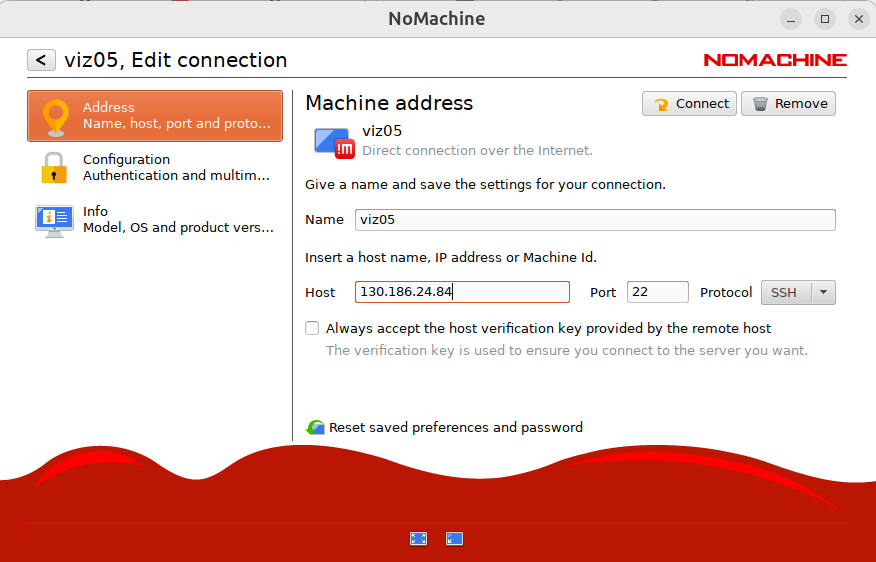
Please find the list of IPs:
viz05-ext.efgw.cineca.it == 130.186.24.84
viz06-ext.efgw.cineca.it == 130.186.24.85
viz07-ext.efgw.cineca.it == 130.186.24.86
viz08-ext.efgw.cineca.it == 130.186.24.87