GAIA
GAIA is composed of 420 general purpose nodes and 80 GPU nodes, also built on OpenStack (version 2025.1 Epoxy). It is not only the biggest of the two infrastructures, but also the only accelerated one, mounting Nvidia GPUs models: A30, L40s and H100NVL.
Note
It is possible to access GAIA via Horizon Dashboard at https://cloud.gaia.cineca.it
For GAIA CLI access, there is no need for certificate chain.
 Openstack Overview Operative Manual
System architecture
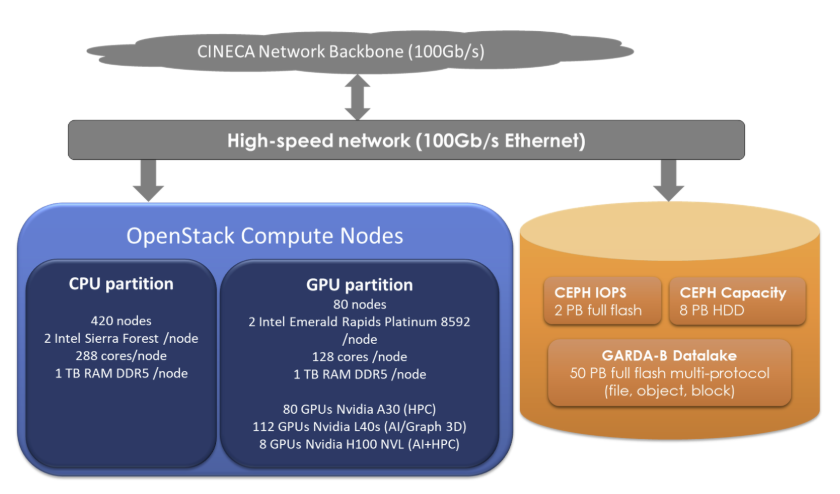
Hardware Details
CPU Nodes |
GPU Nodes |
|
Nodes |
420 |
80 |
CPU |
2x Intel Xeon Sierra Forrest 144 cores 2.2GHz |
2x Intel Xeon Emerald Rapids Platinum 8592+ 64 cores 1.9GHz |
Cores per node |
288 |
128 |
RAM |
1 TiB DDR5 6400 MT/s |
1 TiB DDR5 4800 MT/s |
GPU |
N/A |
Various models: Nvidia A30, L40s, H100 NVL (see below) |
GPU models |
|||
Use case |
HPC |
AI / 3D Graphics |
HPC + AI |
Model |
Nvidia A30 |
Nvidia L40s |
Nvidia H100 NVL |
Max GPUs per node |
4 |
4 |
2 |
Number of nodes |
20 |
28 |
32 |
Total GPUs |
80 |
112 |
64 |
Storage |
||
Use-case |
IOPS-optimized |
Capacity-optimized |
Type |
SSD Ceph |
HDD Ceph |
Size (raw) |
2 PB |
8 PB |
System timeline
Early Availability: 07 May 2026
Start of Pre-Production: 13 July 2026
Start of Production: to be announced
Configuration Details
Instance Flavors
On GAIA, users can choose from a variety of instance flavors, categorized into three main types: HPC, Big-Memory and GPU. Each flavor type is designed to cater to specific use cases and workloads, providing different combinations of vCPUs, RAM, disk space, and GPU resources.
HPC flavors
Flavor Name |
vCPUs |
RAM (GB) |
Disk (GB) |
Available |
|---|---|---|---|---|
hpc.1cpu.3gb |
1 |
3 |
30 |
Yes |
hpc.2cpu.8gb |
2 |
8 |
30 |
Yes |
hpc.4cpu.14gb |
4 |
14 |
30 |
Yes |
hpc.8cpu.28gb |
8 |
28 |
50 |
Yes |
hpc.16cpu.56gb |
16 |
56 |
50 |
Yes |
hpc.32cpu.112gb |
32 |
112 |
50 |
Yes |
hpc.48cpu.168gb |
48 |
168 |
50 |
Yes |
hpc.64cpu.224gb |
64 |
224 |
50 |
Yes |
hpc.96cpu.336gb |
96 |
336 |
50 |
Yes |
hpc.128cpu.448gb |
128 |
448 |
50 |
Yes |
Big-Memory flavors
Flavor Name |
vCPUs |
RAM (GB) |
Disk (GB) |
Available |
|---|---|---|---|---|
mem.8cpu.64gb |
8 |
64 |
50 |
On-Demand |
mem.16cpu.128gb |
16 |
128 |
50 |
On-Demand |
mem.24cpu.192gb |
24 |
192 |
50 |
On-Demand |
mem.32cpu.256gb |
32 |
256 |
50 |
On-Demand |
mem.48cpu.384gb |
48 |
384 |
50 |
On-Demand |
GPU Flavors
Flavor Name |
vCPUs |
RAM (GB) |
Disk (GB) |
#GPUs |
GPU Model |
Available |
|---|---|---|---|---|---|---|
gpu.1-a30.8cpu.64gb |
8 |
64 |
50 |
1 |
Nvidia A30 |
On-demand |
gpu.2-a30.16cpu.128gb |
16 |
128 |
50 |
2 |
Nvidia A30 |
On-demand |
gpu.4-a30.32cpu.256gb |
32 |
256 |
50 |
4 |
Nvidia A30 |
On-demand |
gpu.1-l40s.16cpu.128gb |
16 |
128 |
50 |
1 |
Nvidia L40s |
On-demand |
gpu.2-l40s.32cpu.256gb |
32 |
256 |
50 |
2 |
Nvidia L40s |
On-demand |
gpu.4-l40s.64cpu.512gb |
64 |
512 |
50 |
4 |
Nvidia L40s |
On-demand |
gpu.1-h100.32cpu.256gb |
32 |
256 |
50 |
1 |
Nvidia H100 |
On-demand |
gpu.2-h100.64cpu.512gb |
64 |
512 |
50 |
2 |
Nvidia H100 |
On-demand |
Instance Images
On GAIA, users can select from a variety of pre-configured Images.
Image Name |
Information |
Default User |
Default Access |
|---|---|---|---|
Rocky Linux 9.7 |
Rocky-9-GenericCloud-Base-9.7-20251123.2.x86_64.qcow2 (converted to RAW disk format), last modified 2025-11-23 Source |
rocky |
SSH keypair |
Rocky Linux 10.1 |
Rocky-10-GenericCloud-Base-10.1-20251116.0.x86_64.qcow2 (converted to RAW disk format), last modified 2025-11-16 Source |
rocky |
SSH keypair |
Ubuntu 24.04 |
ubuntu-24.04-server-cloudimg-amd64.img, last modified 2026-03-21 Source |
ubuntu |
SSH keypair |
Ubuntu 26.04 |
ubuntu-26.04-server-cloudimg-amd64.img (converted to RAW disk format), last modified 2026-05-22 Source |
ubuntu |
SSH keypair |
GPU-enabled Instances
To create GPU-enabled instances on GAIA, users can select from a variety of flavors that include different GPU models and configurations (see table above).
A tutorial on creating and configuring GPU-enabled instances, is provided on the Tutorials and Gitlab repositories page.
External Network
On GAIA, the following external network is available:
Network Name |
Description |
|---|---|
|
External network |
Storage (Cinder Volumes)
On GAIA the following cinder volumes types are available:
Volume type |
Description |
|---|---|
|
A cinder volume hosted on SSD storage (best for high performance needs) |
|
A cinder volume hosted on HDD storage (best for high capacity needs) |
|
An encrypted cinder volume hosted on SSD storage. |
|
An encrypted cinder volume hosted on HDD storage. |
Note
Every project on GAIA has a storage quota, defined in the UserDB project page, that is divided by default in:
ssd storage: up to 100 GB
hdd storage: the remaining storage quota, up to the total defined in the UserDB project page
For specific needs, this configuration can be changed by contacting the user support team at superc@cineca.it.
Warning
On GAIA, it is not possible to create a ssd volume from a hdd volume snapshot or vice versa. The volume type must be the same as the source snapshot.
Shared filesystem (Manila Shares)
On GAIA, the following Shares types are available:
Share type |
Description |
|---|---|
|
Uses CephFS protocol |
|
Uses NFS protocol on VAST storage |
Warning
On GAIA, it is currently possible to create a share from a share snapshot only for cephfs shares, not for vast shares.
Load Balancers
On GAIA, users can deploy a Load balancer using the Octavia service. This allows for distributing incoming network traffic across multiple instances, improving the availability and scalability of applications.